A title ID identifies a barony, county, duchy, kingdom, or empire, and is needed for commands that grant or change titles. For most existing realms the ID follows a simple pattern, so you can often guess it without opening the game.
The title ID format
A title ID is usually the realm's map name, lower-cased and joined with underscores, with a single-letter prefix for its rank:
b_— baronyc_— countyd_— duchyk_— kingdome_— empire
So the Kingdom of England is k_england and the Duchy of Normandy is d_normandy. For a complete, searchable reference see the CK3 country tags & title IDs list, and the county IDs list for county-level titles.
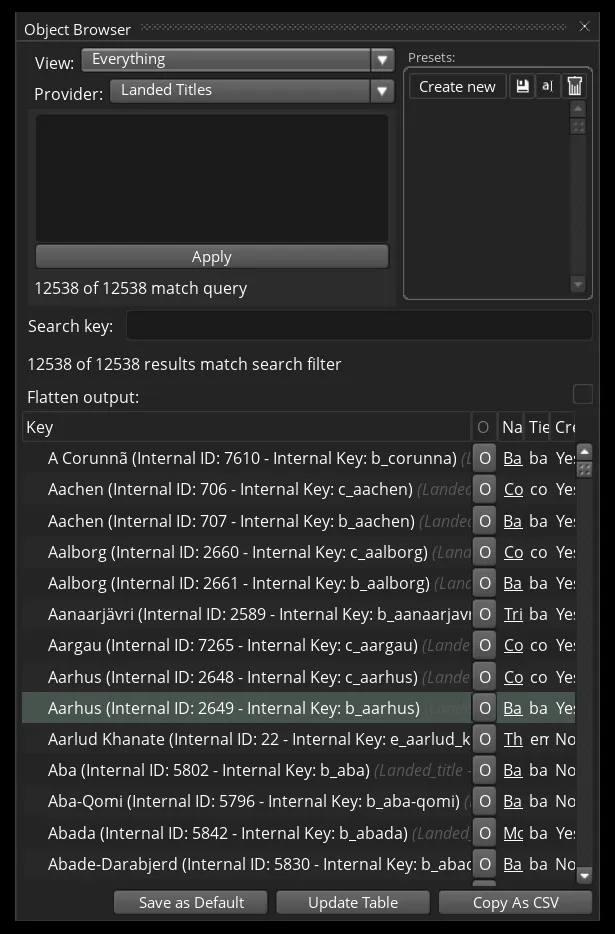
Finding a custom title's ID with the Object Browser
The naming pattern doesn't apply to custom titles you create in-game. For those, use the Object Browser:
- Enable debug mode — see how to open the console.
- Enter explorer in the console to open the Object Browser.
- Search for the title you want to find the ID for.
- Hover over the name field to show the title card.

Drag the first column wider to read the full title ID.
Common commands that use a title ID
Once you have the ID, it slots into the title-related cheats:
- give_title — grant a title to a character, e.g.
give_title k_england 1234. - add_claim — give a character a claim on a title so they can go to war for it.
- add_title_law — change a title's succession or other laws.